Visualizing 86K GitHub Stars as Procedural Lobsters
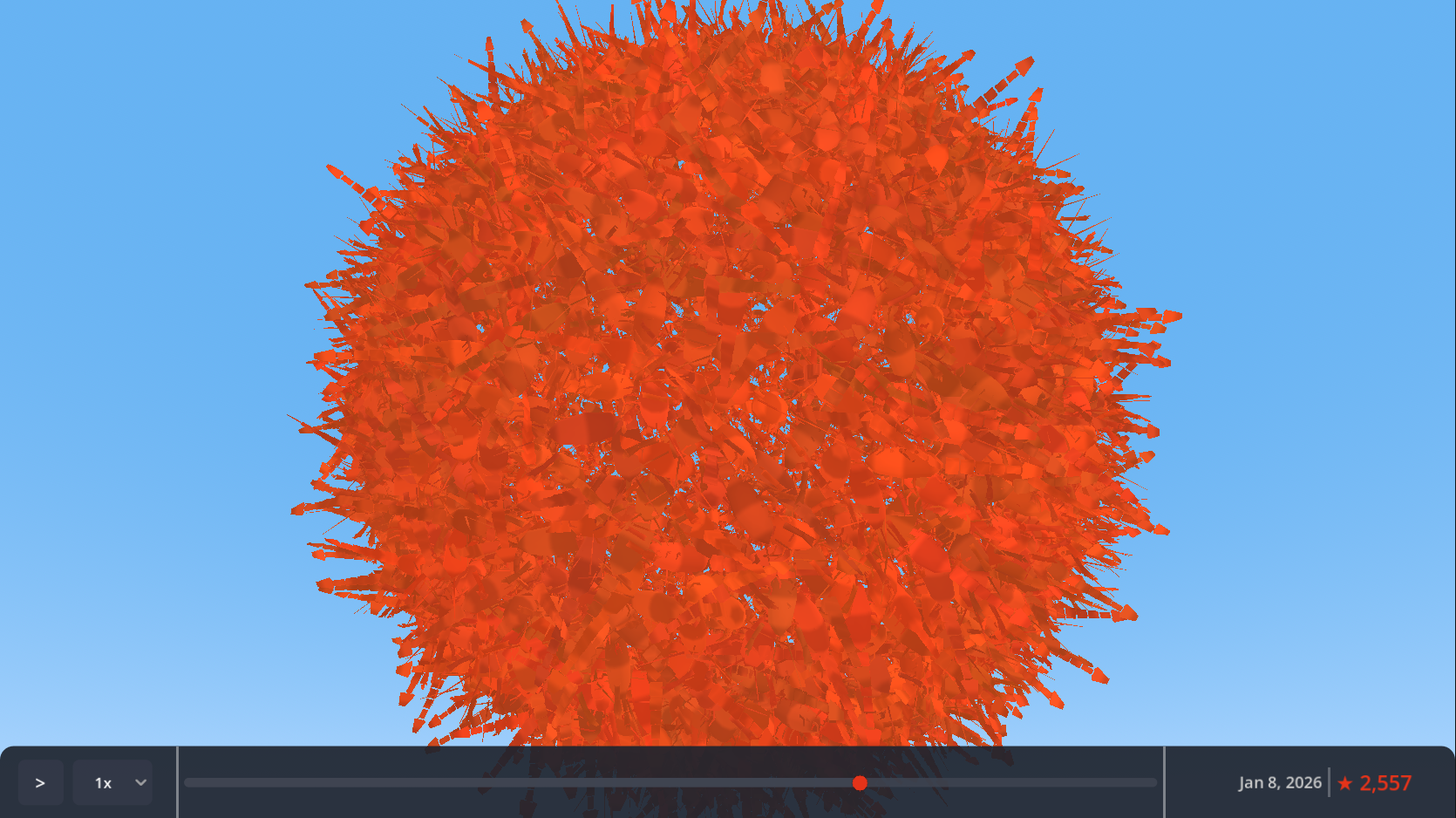
I built a real-time 3D visualization that renders each of moltbot's 86,546 GitHub stars as a procedurally-generated lobster. Here's how I achieved 80K+ instances at 60 FPS in a single day.
I wanted to celebrate a project hitting 86,000 GitHub stars. A counter felt boring. A particle system felt generic. So I rendered each star as a procedurally-generated 3D lobster.
The whole thing took about six hours to build.
Why Lobsters?
The project I was visualizing—moltbot—has a molting/lobster theme baked into its identity. Instead of fighting that, I leaned into it. Each GitHub star becomes a lobster in an ever-growing swarm that users can orbit, zoom through, and scrub across time.
It’s memorable in a way that “86,546 stars” as text never could be.
The 80K Instance Problem
Rendering 86,000 individual scene nodes in Godot would destroy performance. Even at one node per lobster, you’d spend all your frame budget on scene tree overhead before drawing anything.
The solution is GPU instancing via MultiMesh. Instead of 86,000 nodes, you get one node with one draw call. The GPU handles the replication.
var multimesh = MultiMesh.new()
multimesh.mesh = lobster_mesh
multimesh.transform_format = MultiMesh.TRANSFORM_3D
multimesh.use_custom_data = true
multimesh.instance_count = 100000  # Pre-allocate once
I pre-allocate 100,000 instances at startup. Adding a new lobster just means updating its transform and making it visible—no memory allocation, no node creation, no performance spike.
Procedural Lobster Mesh
The lobster is entirely generated via code. No 3D modeling software involved. About 340 triangles per instance:
| Component | Details |
|---|---|
| Body | Elongated ellipsoid (8 segments × 5 rings) |
| Tail | 5 segmented plates + 3-plate fan |
| Claws | Two articulated pincers (asymmetric sizing) |
| Legs | 6 pairs of jointed appendages |
| Antennae | Two curving feelers |
Procedural generation means I could iterate on the design in code without round-tripping through Blender. It also keeps the web export small—no external mesh files to load.
Avoiding the Clone Army
80,000 identical lobsters would look like a screensaver from 1998. The shader adds variation through custom data packed into each instance:
- RGB channels: Color tinting (body hue, claw accent, belly lightness)
- Alpha channel: Animation phase offset
Each lobster bobs and sways on a sine wave, but with a unique phase offset. The result is organic motion—no two lobsters move in sync.
float phase = INSTANCE_CUSTOM.a * TAU;
float bob = sin(TIME * 2.0 + phase) * 0.1;
VERTEX.y += bob;
Fibonacci Sphere Distribution
Where do you put 86,000 points on a sphere so they don’t look gridded or clumped?
The golden angle spiral. It’s the same pattern sunflower seeds use—mathematically proven to avoid visible patterns at any scale.
const GOLDEN_ANGLE = PI * (3.0 - sqrt(5.0))  # ≈ 2.39996

func get_position(index: int, total: int) -> Vector3:
    var y = 1.0 - (float(index) / (total - 1)) * 2.0
    var radius_at_y = sqrt(1.0 - y * y)
    var theta = GOLDEN_ANGLE * index
    return Vector3(
        cos(theta) * radius_at_y,
        y,
        sin(theta) * radius_at_y
    ) * sphere_radius
At 86K instances, you can zoom in anywhere and the distribution still looks natural.
Time Travel UI
The visualization isn’t static. A timeline lets you scrub through the project’s star history—from 13 stars on day one to 86,546 at present.
The data pipeline fetches star timestamps via GitHub’s GraphQL API (the REST API caps at 40K stars), aggregates them into daily counts, and exports as JSON. About 270 data points covering 62 days of growth.
Binary search finds the right count for any date: O(log n) for 270 points is effectively instant.
Web-First Decisions
The target was web browsers, which constrained several choices:
GL Compatibility renderer. Godot’s Forward+ looks better but requires WebGPU, which lacks browser support. GL Compatibility targets WebGL 2.0—works everywhere.
Unlit rendering. No shadows, no complex lighting. Consistent performance across devices and a cleaner visual style.
Touch controls. Pinch-to-zoom and drag-to-orbit work alongside mouse input.
Auto-zoom camera. As the swarm grows, the camera automatically pulls back to keep everything visible. Users can override manually.
What Took the Time
Six hours sounds fast. Here’s the rough breakdown:
| Phase | Time |
|---|---|
| MultiMesh setup + camera controls | 1 hour |
| Procedural lobster mesh generation | 2 hours |
| Shader for instanced variation | 1 hour |
| Data pipeline + timeline UI | 1.5 hours |
| Polish (auto-zoom, colors, web export) | 0.5 hours |
The procedural mesh was the most time-consuming part. Getting a lobster to look like a lobster through code—not Blender—required iteration. The rest was applying known techniques.
What I Learned
GPU instancing is the answer. Any time you need thousands of similar objects, reach for MultiMesh (or equivalent in other engines). The performance difference isn’t incremental—it’s categorical.
Procedural generation pays compound interest. Building the mesh in code felt slower initially, but it eliminated the art pipeline entirely. Changes were instant. The web export stayed small.
Fibonacci spirals are magic. I’d used golden angle distribution before, but seeing it hold up at 86K points was still satisfying. The math just works.
Web constraints clarify. Targeting the browser forced me to keep things simple: unlit shading, no post-processing, minimal file sizes. The result was a cleaner project.
Would I Do This Again?
Already thinking about it. The same technique could visualize any time-series data—commits, downloads, user signups—with thematic 3D objects instead of charts.
The lobsters made this project memorable. The instancing made it possible.
Source Code
The full source code is available on GitHub, including the Claude workflow I used to build it.